How to Wire Up Data and Permissions — Usable Without Losing Control
On an FDE's first day on-site, the first question for the customer is usually "where's the data?" Th…
Trust, but verify. — Russian proverb, popularized by U.S. President Ronald Reagan, who invoked it repeatedly at the 1987 signing of the INF Treaty
On an FDE's first day on-site, the first question for the customer is usually "where's the data?" The most common answer: "it's all in the system."
In real AI deployments for new customers, merging seven or eight scattered data sources is routine — email, spreadsheets, CRM, ERP, structured and unstructured data all mixed together. Companies that have been rolled up through private equity acquisitions are the extreme case — sometimes running four ERP systems at once, and the customer itself can't say what its own data actually looks like1. So the accurate translation of "it's all in the system" is: nobody knows where it is yet.
The pitfalls of data access start with that very first question — and something more dangerous than "where" is "who can see it."
I. On Day One, Ask Five Questions First
Turning data access into schedulable work starts with five questions: Where is the data? Who owns it? Who can see it? How does masking work? What's the process for exceptions?
None of the five can be skipped. Miss "who owns it" and permission requests land on the wrong desk — one round trip alone costs a week. Miss "who can see it" and the agent's output can leak straight to someone who shouldn't see it. Miss "the exception process" and the first time data needs to cross a boundary, work stops while everyone waits for an executive to make the call.
Any project that can't answer these five questions gets two weeks added to the schedule, automatically. That's not a penalty — it's just realism: pulling data together is usually the first wall a team hits after arriving on-site, and it gets hit before any permission design even begins1. Chapter 6 already asked "can the data actually be obtained" once, during discovery — this section is that question's sequel during the engineering phase. Discovery asks whether the data exists at all; here the questions are how to get it, how much to get, and who gets to see it.
Once you've mapped out where the data lives, there's another reality to accept: the system the agent needs to write back to is very likely one the customer has run for over a decade. Chapter 7 already gave the fix — read from the old, write to the new: read data from wherever it already lives, interact through an interface, and never wedge code into the legacy system.
II. Contract First, Data Second
Once the five questions are answered, the answers can't just sit in the FDE's notebook — they need to be written up as a Data Contract before any data gets touched (see Figure 10-1).
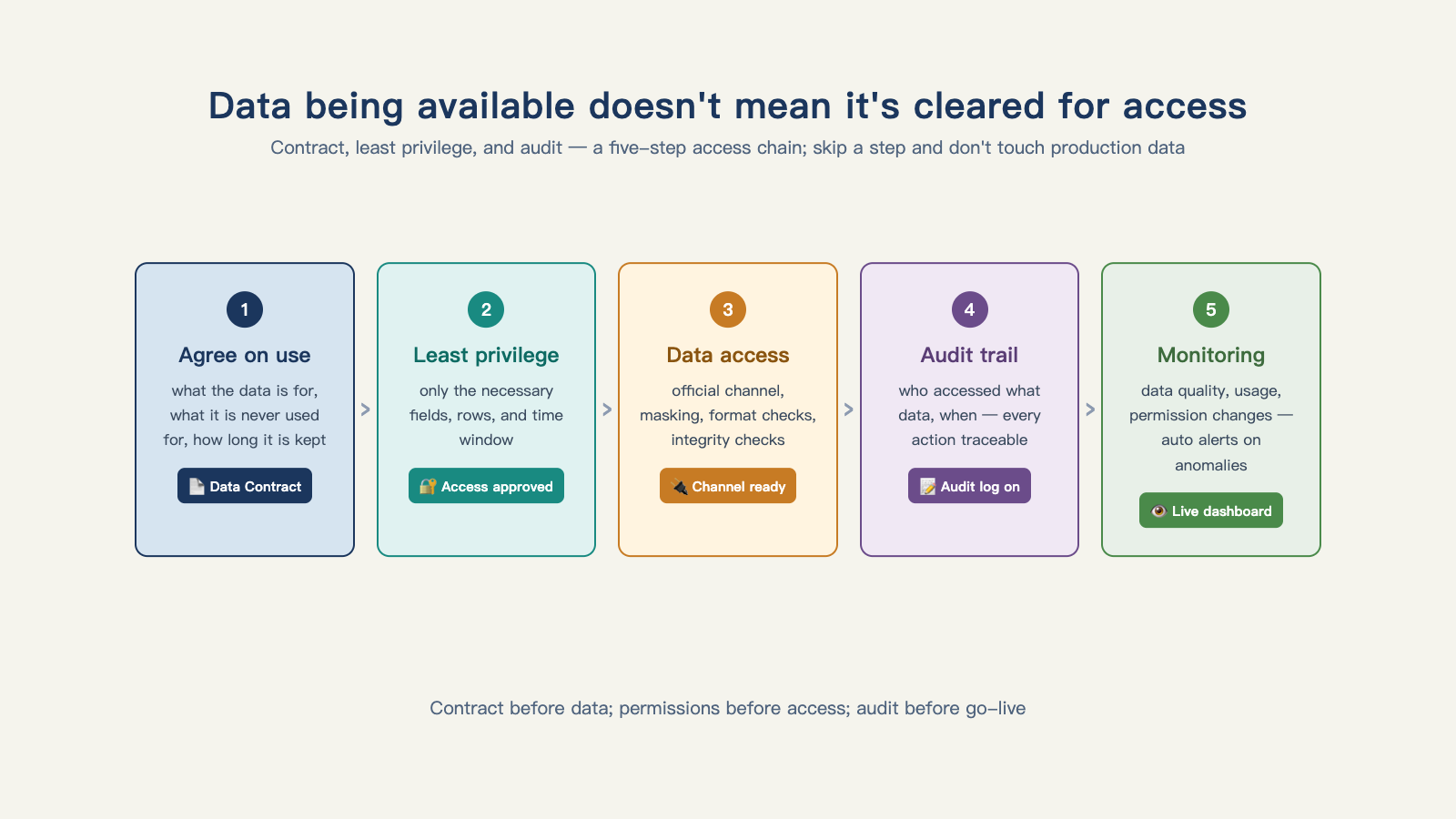
Figure 10-1: Data being available doesn't mean it's cleared for access — the contract, least privilege, and audit trail are all required.
The contract spells out four things: access scope (which tables, which fields, precise down to the column); result visibility (who can see what the agent produces, and can it leave the building); retention and destruction (how long the vendor holds the customer's data, and how it gets destroyed once the project ends); and audit requirements (who reviews the access logs, and how often)2.
This contract has three users. The customer's compliance review uses it: the security department's sign-off is looking at exactly this piece of paper, and without it the project can't clear the process. The FDE uses it to constrain their own implementation: if the contract says read-only access to three tables, the code only gets connections to three tables — this is a boundary for the engineer, not a posture for the customer. Post-incident accountability relies on it: if a real data incident happens, both sides sort out responsibility against the contract's terms, instead of pointing fingers at each other.
Why can't the order be reversed? Because a PoC without a contract is running naked through the customer's data warehouse — if something goes wrong, there's no basis for accountability, and even if nothing goes wrong, it still won't clear the customer's security review. A lot of people think "get it running first, write the contract later" counts as flexibility. It's actually just deferring the engineering effort behind two walls — data and permissions — to the most expensive possible moment.
III. An Agent's Permissions Are Inherited, Not Assigned
The contract governs data; permissions govern action. And here's the most common mistake in the industry: requesting a broad-permission service account for the agent — "convenient, set it up once and done."
The correct approach is this: the agent inherits the permissions of the user who triggered it, with a full trail left behind.
There's already a product-level example of this. Palantir turned its own AI FDE into a product, and the documentation states plainly that every action the agent takes follows the user's existing permissions — whatever the user can't see, the agent dispatched on their behalf can't see either3.
Box's CEO supplies the other half of this real-world constraint: an agent only holds the human's existing permissions, and it won't route around the permission wall — being stuck on permissions just means being stuck, and that doesn't change no matter how much stronger the model gets4.
Put the two together and you get one conclusion: an agent's permissions equal the triggering user's permissions, plus a full trail — never request superset permissions at the service-account level. The problem with superset permissions isn't that they "might be abused" — it's that they can never be sorted out. On the day something goes wrong, when the audit log shows an action from that all-powerful account, you can't prove it was a human, and you can't prove it was the agent.
IV. Permission Configuration Is Something You Do Together with the Customer's IT Team
In engineering terms, permissions don't just gate data reads — they also have to govern the consequences of an action: who can trigger an outbound send, who can write to a production table, who can run privileged actions in production. Front-line teams control tool calls across three layers — permission, role, and scenario: the same person can do different things in staging than in production; the same tool carries different permissions for reading data versus writing it5.
How this actually gets done deserves its own callout: a junior FDE at a Japanese AI company documented their own configuration experience — working item by item alongside the customer's administrator to configure production permissions for M365 and Entra ID6. Notice the picture here: the FDE and the customer's IT sitting side by side in front of the same screen. Permission configuration isn't something a vendor delivers unilaterally — it's work both sides do together, because every boundary permissions draw takes away some convenience from a real person inside the customer's organization.
This also answers a common complaint: "the customer's IT won't cooperate." Flip the perspective: if an outside team wanted to punch a hole in your own permission system, your first instinct would be to scrutinize it too. Turn permission configuration into shared work, and the customer's IT team shifts from gatekeeper to partner — every change after that goes a lot faster.
V. Data Sensitivity Determines the Deployment Model
There's one last decision in data access: where does the model run — a cloud API, a private deployment, or fully on-premises?
This decision isn't a matter of technical preference. It's set by the data's sensitivity level.
Split the data into four tiers: public (marketing materials, published reports); internal (process documentation, non-sensitive operating data); sensitive (customer personal information, transaction records); and regulated (data under industry regulation, such as core medical or financial records). Each tier maps to a different deployment model: public and internal data can go through a cloud API; sensitive data leans toward private or on-premises deployment; regulated data can often only run on-premises.
One front-line lesson walked this whole path start to finish: a customer-service agent project sailed through its first two versions, and only when it came time to run experiments on real customer data did a data-security problem surface — budget constraints left the team no choice but to deploy a small model on-premises, and quality took a hit as a result5. What makes this case valuable is its honesty: data sensitivity determines the architecture, not the other way around. When sensitive data forces the deployment down to on-premises, both the model choice and the ceiling on results get constrained right along with it — that's not an engineering preference, it's a constraint propagating downstream.
So sensitivity tiering needs to happen back in discovery — the fourth filter in Chapter 6 (data reachability), which asks "what data is needed, who owns the permissions," already includes this question. Get sensitivity mapped out during discovery, and there's room in the quote to budget for it; miss it, and "suddenly we need on-premises deployment" becomes a rework during the production phase.
VI. Every Access Leaves Evidence Behind
The last piece of the puzzle: the audit log.
Every data access — who initiated it, which table it read, when, for which task — gets recorded as a log entry. Its value doesn't show up on an ordinary day; it's the only answer available the moment a compliance inquiry lands. When the customer's security team asks "exactly what data has your agent touched," two kinds of answers carry completely different weight: one is "we've never had an incident," the other is exporting the log — every access documented and traceable.
The first is a promise; the second is evidence. Enterprise trust doesn't run on promises — it only runs on evidence. This is Chapter 13's theme (trustworthy results), making an early appearance here at the data layer: logging is an architectural decision, not something written up after the fact. The audit log runs from day one — that's the engineering payoff of the "audit requirements" line in the Data Contract.
The signal that the data-and-permissions wall has come down can be written up as an acceptance sheet: the Data Contract is signed, the permission-inheritance model works, joint configuration with the customer's IT is done, sensitivity tiering has settled the deployment model, and the audit log is running. Only once all five are in place does it make sense to talk about the next thing: letting the agent actually get to work. And the moment it can act, the next question shows up immediately — where exactly is the boundary on each of its actions?
Footnotes
-
Silicon Valley 101, Episode 240: "The Hottest New Job in Silicon Valley — FDE" ↩ ↩2
-
enterprise_agent_platform (open-source enterprise agent platform engineering project) ↩
-
Palantir Foundry, "AI FDE" product documentation ↩
-
a16z, Box CEO on AI agents and why enterprises can't keep up ↩
-
"I Thought FDE Meant Fighting Alone at the Customer Site" — What Two Months on the Job Actually Looks Like ↩